
Table of Contents

01.
Overview
02.
Architecture
03.
Properties
04.
Monitoring
05.
Integration
06.
Metrics
07.
Usecases

Azure Service Bus serves as a fully managed enterprise integration message broker, offering a highly reliable cloud service through Microsoft Azure. This powerful tool ensures efficient message delivery at scale, making it an essential component for both cloud-native and hybrid applications. With its queues and topics, Azure Service Bus enables asynchronous, decoupled communication to facilitate a smooth flow of information between applications.
The Azure Service Bus's primary feature is its Message Queues, providing FIFO (First In, First Out) capability coupled with message duplication detection. This feature ensures an orderly processing environment where each message is processed only once and strictly in the sequence it was received. Consequently, it aids in managing tasks like order processing with utmost efficiency.
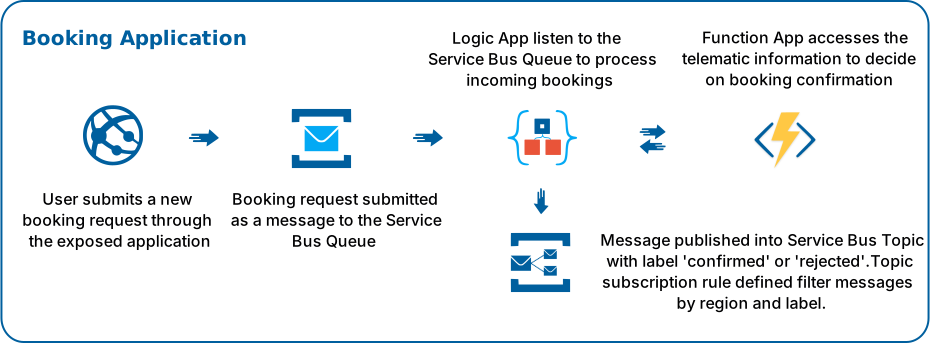
Another essential characteristic of Azure Service Bus is its Publish-Subscribe model, encapsulated in its Topics and Subscriptions. Implementing the publish-subscribe pattern, this feature allows one-to-many communication, all in a unidirectional flow, ensuring broad message dissemination.
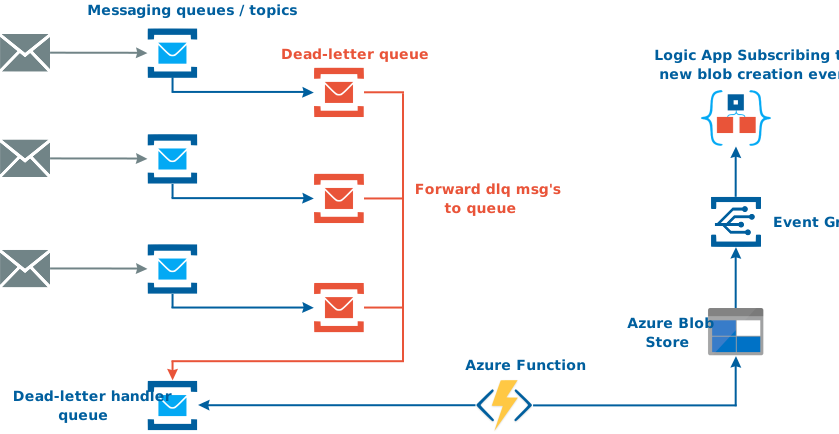
The Dead-Lettering feature of Azure Service Bus offers robust error handling. When a message cannot be processed, the service automatically relocates it to a separate queue, known as the dead-letter queue, facilitating further analysis and investigation.
Azure Service Bus's Scheduled Delivery capability ensures messages become available for processing at a predetermined time. This feature allows for the systematic management of tasks and operations.
With its Batching feature, Azure Service Bus optimizes resource utilization by minimizing the calls to Service Bus. It achieves this by batching multiple messages to be sent or received in one operation.

Transactions support in Azure Service Bus allows grouping of two or more operations into a transaction that executes atomically, ensuring consistency and reliability.
The Sessions feature provides an effective way to manage sequences of related messages, thereby supporting workflows and interrelated processes.
When it comes to Security and Compliance, Azure Service Bus complies with industry-standard protocols and regulations. It employs a federated security model and provides comprehensive identity and access management features, ensuring that your data is protected.
Lastly, the Auto-forwarding feature offers advanced routing capabilities. This allows chaining of queues and topics to form intricate routing paths, facilitating more complex communication structures.
Compare Azure Messaging Services

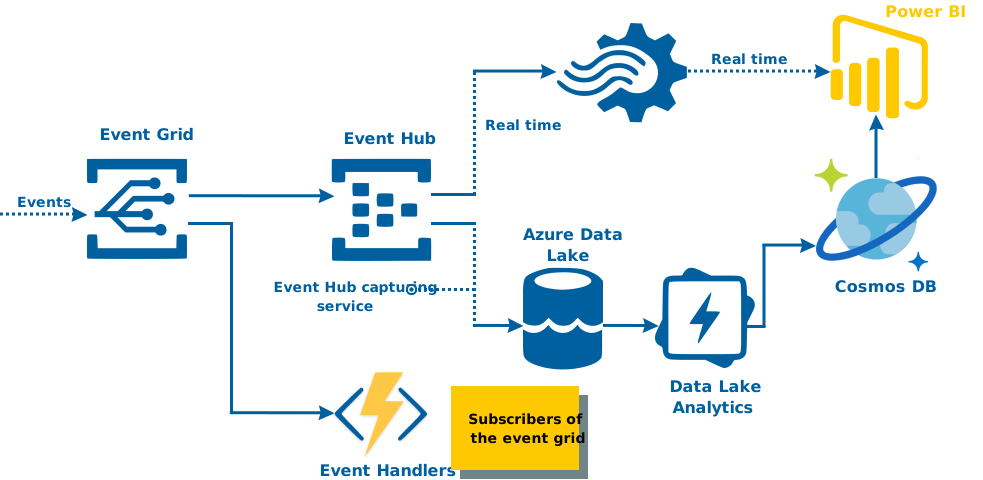
Microsoft Azure offers several messaging services, each of them designed to cater to different use-cases. The main three messaging services are Azure Service Bus, Azure Event Hubs, and Azure Event Grid.


Architecture
Azure Service Bus is a message broker system providing communication capabilities in the form of messages between various applications, services, and servers. The architecture of Azure Service Bus is centered around several key components: Namespaces, Queues, Topics, Subscriptions, and Messages.
At the core of the Azure Service Bus architecture is the Namespace, a container for all messaging components. Each Namespace contains a set of queues, topics, relays, and event hubs, and serves as an application container and isolation boundary within the Service Bus. Each Namespace has a unique Fully Qualified Domain Name (FQDN), providing a distinct identification within the Service Bus ecosystem.
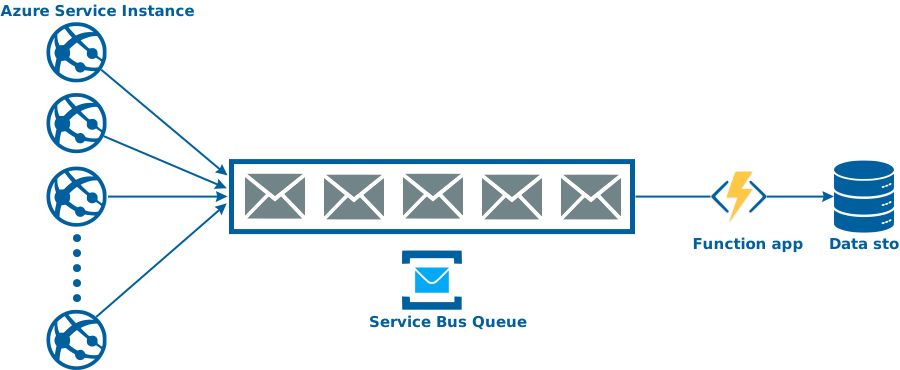
Queues in Azure Service Bus facilitate a First In, First Out (FIFO) message delivery, enabling one or more competing consumers to process messages in the order they were added to the queue. This architecture guarantees that each message is received and processed by only one receiver, thereby ensuring the integrity and sequence of the messages. Queues form the backbone of point-to-point communication in the Service Bus.
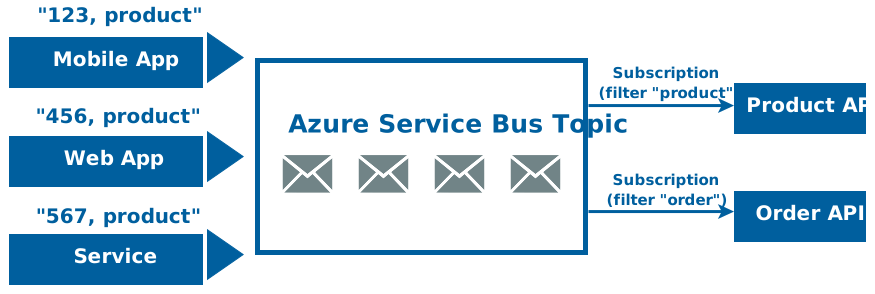
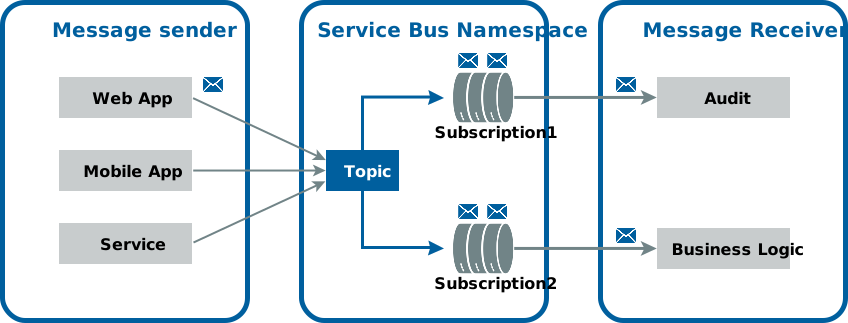
Topics, on the other hand, cater to the publish/subscribe communication mechanism. A sender application sends a message to a topic, and any number of receiver applications with subscriptions can receive that message. This many-to-one communication method is particularly useful when a single message needs to be received by multiple receivers, each with their unique settings.
A subscription is associated with a specific topic, allowing for a more fine-tuned message reception. Each subscription can use filters to receive only particular types of messages published to the topic, thereby allowing multiple subscribers to consume a message from a topic tailored to their requirements.
Messages are the fundamental units of data exchanged between applications in Azure Service Bus. A message consists of a header, containing standard and custom properties, and a body that contains the application-specific data. This structure allows for efficient message processing and data integrity.
Azure Service Bus Relays offer a unique feature allowing on-premises services to project public endpoints, facilitating bi-directional communication without intrusive changes to the corporate network infrastructure. They effectively bridge the gap between on-premises systems and the cloud.
Event Hubs are part of the Azure messaging ecosystem, designed to handle event and telemetry ingress at a massive scale. This is ideal for telemetry and event data scenarios where high throughput is required.
he Azure Service Bus incorporates a robust security model. Access to queues, topics, and subscriptions is controlled through Shared Access Signature (SAS) tokens, providing granular control over permissions. This security model is also integrated with Azure Active Directory for robust identity management.
The Service Bus architecture includes a feature for Duplication Detection, preventing the processing of duplicate messages sent within a particular time span. In scenarios where messages cannot be processed, a dead-lettering feature moves undeliverable messages to a separate dead-letter queue for later inspection. Moreover, to ensure consistency across operations, the Service Bus supports transactions, allowing multiple operations to be grouped into a single atomic operation.
In conclusion, the Azure Service Bus provides a comprehensive and reliable messaging broker service for integrating diverse applications. With its robust architecture that includes namespaces, queues, topics, subscriptions, and a secure model, it stands as a pivotal tool in developing sophisticated cloud-native, hybrid, and on-premises applications.
Concepts
Azure Service Bus is a managed service provided by Azure for message delivery, and it includes several important concepts:
Queues Vs Topics
Azure Service Bus provides two types of communication mechanisms: Queues and Topics. They serve different use cases and have distinct characteristics.
Azure Service Bus Queues
One-to-One Communication
To help give your audience an overview, this section can include a brief description of the goal, its relevance to your sector or industry, and the specific sub-targets your organization is addressing.
Order Guarantee
Messages are processed in the order they are received. This is also known as First-In-First-Out (FIFO) processing.
Pull-based Communication
The receiver actively retrieves the message from the queue when it's ready to process it.
Single Delivery
Each message is received and processed by only one message receiver.
Azure Service Bus Topics
One-to-One Communication
Topics are useful for publish/subscribe scenarios. Multiple receivers can subscribe to a topic and receive a copy of the message.
Filters
Subscriptions (receivers) can define filters based on the properties of incoming messages, ensuring that they only receive messages of interest
Multiple Subscriptions
A single topic can have multiple subscriptions, allowing one message to be received by multiple independent receivers.
Single or Multiple Delivery
Depending on the number of subscriptions, the message is received and processed by one or many receivers.
Message Properties
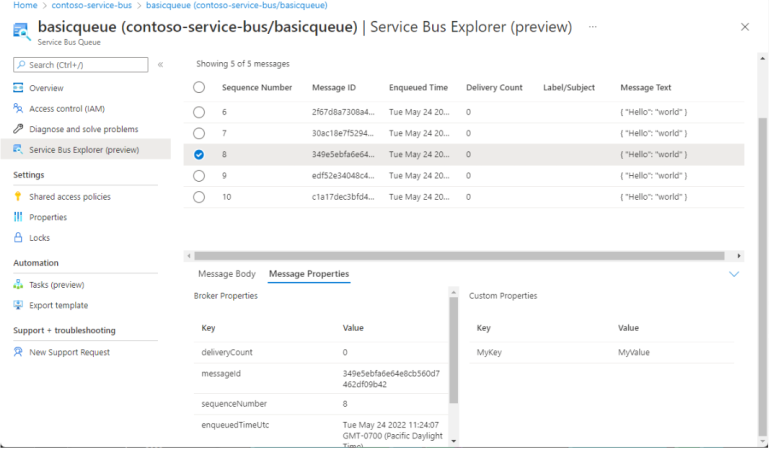
Properties in Azure Service Bus provide metadata and control structures that can be used to handle and route messages. They are divided into three categories: system properties, custom user properties, and message headers.
1. System Properties
These are built-in properties that are set by Azure Service Bus itself and provide information about the state of the message. They cannot be changed. System properties include:
MessageId
A unique identifier for the message.
SequenceNumber
A unique identifier assigned by Service Bus when a message is accepted and stored.
EnqueuedTimeUtc
The time at which the message was stored in the queue or topic.
DeliveryCount
The number of times this message was delivered to clients.
To
The address of the queue to which the message is sent.
ReplyTo
The address of the queue to which reply messages should be sent.
Label
An application-specific identifier for filtering purposes.
2. Custom User Properties
These properties can be set by the user for any purpose. They provide a way to attach metadata to the message that can be used by the receiving application.
3. Message Headers
These include standard HTTP headers such as ContentType and CorrelationId. The ContentType property is used to specify the type of the content, and the CorrelationId property can be used to group related messages.
Message details
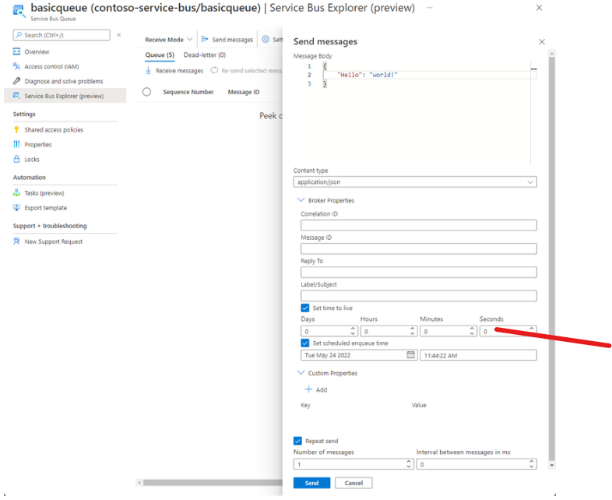
In Azure Service Bus, a message is a binary format of data that can be XML, JSON, text, or any other type of data that any service can understand. It consists of specific parts including body, properties, and headers.
1. Body
This is the main part of the message that contains the application-specific data. The body format is application-specific and Service Bus does not interpret this data.
2. Properties
The properties are name-value pairs used to provide additional information about the message. There are two types of properties:
System Properties
These are built-in properties that provide information about the state of the message. They are set by Azure Service Bus and cannot be changed. Examples of system properties are MessageId, SequenceNumber, To, ReplyTo, Label, etc.
User Properties
These are custom properties that can be defined by the sender application and can be used for any purpose. These properties can be used by receivers for filtering and processing messages.
3. Headers
Headers carry information required for processing the message, such as the ContentType and CorrelationId.
Metrics
Azure Service Bus metrics provide insights into the behavior, performance, and health of your Service Bus namespaces, queues, topics, and subscriptions. These metrics are essential for monitoring your Service Bus resources and troubleshooting issues.
Here are some of the key Azure Service Bus metrics you should know:
Requests metrics
Azure Service Bus provides metrics that let you monitor your Service Bus namespaces at a granular level, giving you insights into the behavior, performance, and health of your messaging system.
In terms of requests, here are some important metrics you should understand:
01 Successful Requests
This metric measures the total number of successful requests to your Service Bus entities, including sending and receiving messages, and managing resources.
02 Throttled Requests
Azure Service Bus throttles requests when a threshold (like number of connections, size of entities, or message rate) is exceeded. Throttled Requests counts the number of requests that were limited due to these constraints.
03 Server Errors
This metric counts the number of requests resulting in HTTP 5xx responses. This could indicate issues with the Service Bus service itself.
04 User Errors
This metric measures the total number of requests resulting in HTTP 4xx responses, indicating client-side errors. This could be caused by an attempt to retrieve a message from an empty queue, or a request for a non-existent entity.
05 Requests Per Second
This is an important performance metric that indicates the number of requests (both successful and failed) made per second to your Service Bus entities.
Azure Service Bus Application Telemetry
1. Azure Monitor
This service allows you to collect, analyze, and act on telemetry data from your Azure resources. With Azure Monitor, you can visualize real-time performance metrics of your Service Bus namespace, including metrics related to messages, requests, connections, and more. These metrics can be used to understand the behavior of your applications, identify bottlenecks, and troubleshoot issues.
2. Diagnostic Logs
Azure Service Bus supports Azure Diagnostic Logs, which provide detailed logging of operations performed by Service Bus. These logs can be streamed to various endpoints for analysis, such as Azure Monitor logs, Azure Event Hubs, or Azure Storage.
3. Integration with Application Insights
Application Insights is a feature of Azure Monitor and can be used to monitor your live applications. It automatically detects performance anomalies, and includes powerful analytics tools to help you diagnose issues and to understand what users actually do with your app.
4. Azure Monitor Alerts
With Azure Monitor, you can set up alerts based on metrics or logs, so you get notified when an anomaly occurs. For example, you might want to be alerted when there are too many active messages in a queue, or when the rate of incoming requests exceeds a certain threshold.
5. Metrics Explorer
Metrics Explorer in Azure Monitor can be used to visualize and query the metrics collected from your Service Bus.
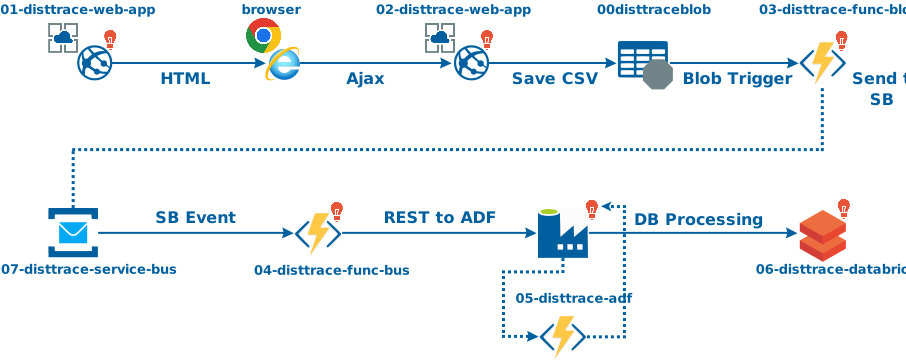

Decoupling Systems
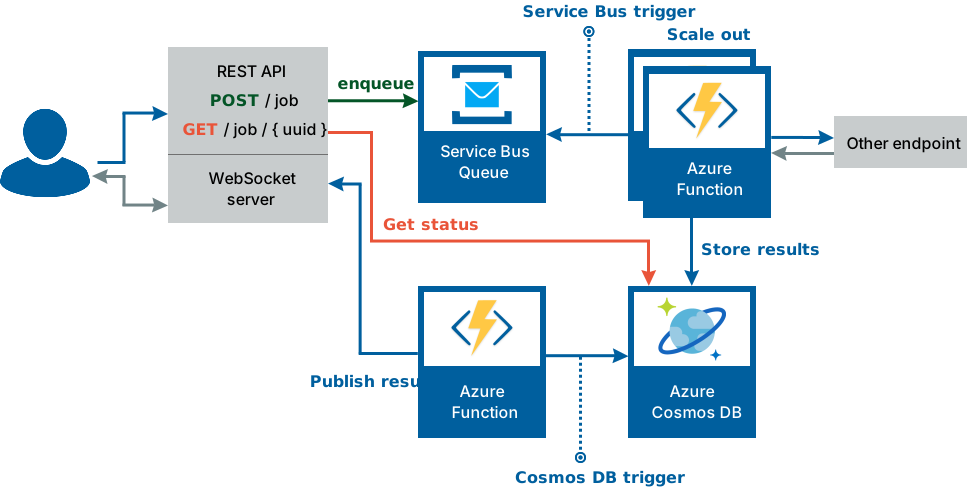
Azure Service Bus can be used to decouple different parts of an application, allowing them to interact via messages. This can make the application more scalable and resilient
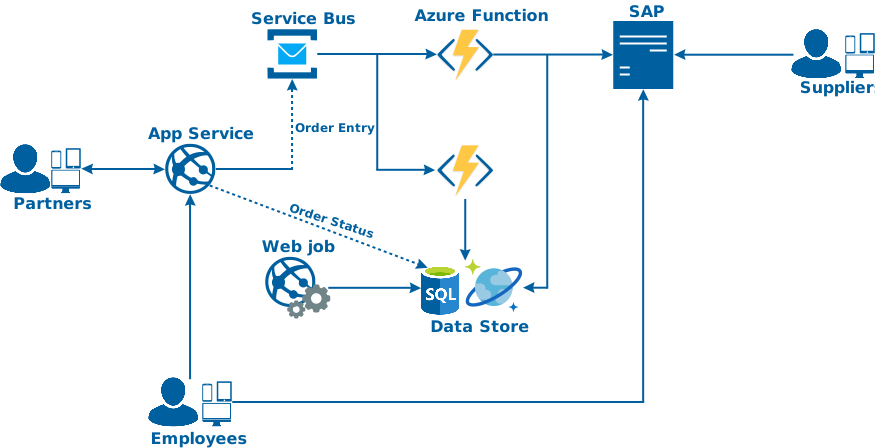
Asynchronous Messaging
Azure Service Bus provides a reliable and durable platform for asynchronous messaging, allowing tasks to be performed in the background or at a later time.
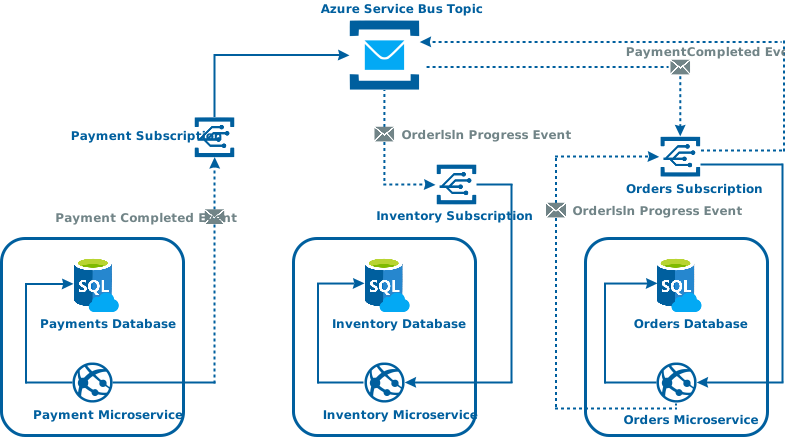
Load Balancing
Messages sent to a Service Bus queue can be processed by multiple receivers. This allows for load balancing where workloads can be distributed across multiple processing units.